UI/UX Design
Make the next step clear, on every screen.
Teqaniyah designs web and mobile interfaces around the tasks people need to complete. We turn business requirements into user flows, screen designs and a reviewable prototype, with Arabic and English layouts considered together.
Based in Amman, Jordan · Arabic & English
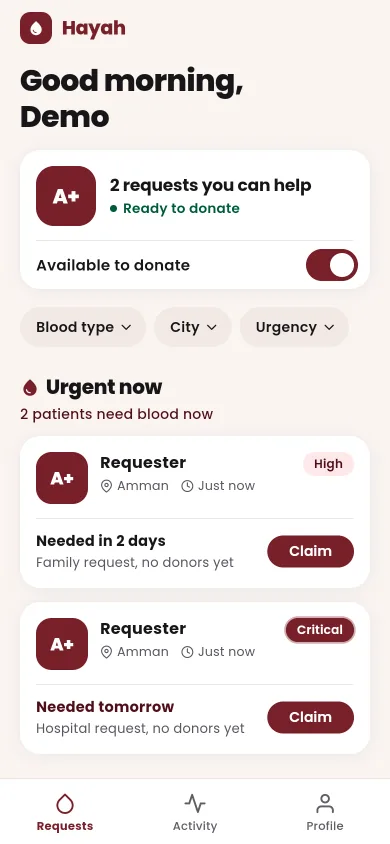
Fictional data. Explore the case study for the implementation and verification boundaries.
When it fits
Design is useful when it resolves a decision: what the user needs to do, what the screen must explain, and what happens next.
An idea that needs a clear journey
Define the main task and the steps it requires before building a large set of screens. Separate customer actions from staff responsibilities and identify the information each role needs.
An existing product with friction
Review a specific journey such as registration, creating a request or managing a record. Use available feedback and observed problems rather than assuming a visual refresh will solve them.
Arabic and English interfaces
Plan direction, content length, form labels, navigation and mixed-language records. A translated label does not by itself make a layout suitable for right-to-left use.
What we can build
Choose the journeys and level of detail together. A prototype is a design deliverable, not proof that backend behaviour has been implemented.
Journey and information structure
Document users, tasks, roles and entry points. Map the selected flows and agree which information and actions belong on each screen.
Wireframes and screen designs
Review structure before visual detail. Design the agreed screens using consistent typography, spacing and reusable interface patterns appropriate to the product.
Prototype and interface states
Connect selected screens for review and specify loading, empty, error, validation and success states. Include keyboard, text readability and touch-target considerations.
Implementation handover
Provide the agreed design assets, component guidance and interaction notes. Confirm review rounds, file ownership, translation and developer collaboration in the scope.
The final deliverables, schedule, ownership and support responsibilities are agreed in the project scope—not assumed from this page.
How we approach it
Understand the task
Review the brief, existing product and available evidence. Agree the audience, priority journey and constraints. Recruitment and formal user studies require a separate scope.
Map and simplify
Sketch the information structure and flow. Resolve missing steps and role boundaries before polishing screens.
Design and review
Develop the selected interface and prototype. Review Arabic and English examples, responsive behaviour and less comfortable states such as errors.
Prepare for implementation
Document component behaviour and agreed assets. Define what is ready to build, what remains a design assumption and how implementation will be reviewed.
Relevant work
These are projects from founder Mohammad Shams’s own portfolio, not client endorsements. Screenshots use fictional local demo data; they are not usage or outcome metrics.
Mobile journeys · Staff workflows
Hayah
Separate donor/requester screens from the staff console. The portfolio shows request browsing, account screens and an administrative view with different responsibilities.
Local demo interfaces with fictional data. No usability-study result, clinical validation or measured improvement is claimed.
Read the case study: HayahStorefront · Product presentation
Selleva
A mobile storefront and catalog administration explore different customer and operator tasks. The case study distinguishes connected product screens from prototype interactions.
In development. A cart interface is not evidence of a persistent basket, completed checkout or improved sales.
Read the case study: SellevaBefore we start
Can we scope design without development?
Yes. Agree the journeys, screens, prototype depth, file handover and review rounds. Design and implementation are different deliverables; a clickable prototype does not include a working API or production application.
Do you include user research?
We can review existing feedback and discuss an appropriate research plan. Participant recruitment, interviews, usability sessions, consent and analysis must be explicitly agreed. We do not present untested assumptions as research findings.
How do you handle Arabic and English?
We consider both directions, representative content and interface states during design. Translation ownership and bilingual review are agreed separately; automatic mirroring alone is not a sufficient review.
Is accessibility guaranteed by the design?
Design can specify readable contrast, focus, labels and interaction behaviour. Accessibility also depends on implementation and testing. No WCAG certification or guaranteed compliance is implied by a design file.
Start with the problem, not a feature list.
Tell us who will use the product, what they need to do, and what you already have. If you have a target date or budget range, include it so we can discuss a realistic scope.